Wednesday, December 28, 2011

I should wear make up more often


I always have to smooth my skin and take out the bags under the eyes, and I tell myself, it's not really much edit, just how I'd look if I put on some concealer and powder.  This time I added eyelashes too, thank you ss eyelashes at www.obsidiandawn.com .  They have cool eyeshadows too.  I add them one lid at a time onto transparent layers, then shrink or revolve and adjust opacity until they look right, like mine when I put on mascara.  I promised my granddaughter a makeup day soon, and then we'll take glam shots and touch up from there.  I'll leave the wrapping paper off.

postscript- a little makeup and combing the hair DOES help!

Monday, December 5, 2011

The microphone is fixed!


So I have completed and am uploading another tutorial, Using brushes and art in photoshop and photoshop elements, to Youtube. It is taking an incredibly long time to upload though, I tried yesterday and am giving it another go right now.  It worries me some because of the viral onslaught I had recently, but I read where many other users have had problems too.  So, it should be visable in an hour or two here .

I've seen some fabulous designer camera bags for women, look like very luxe purses with prices to match.  I craved one but would never pay that price, well maybe even if I could afford it.  But with all my crawling around looking for free patterns, it's so obvious the solution is to sew it yourself!!!  Here's one that I really loved where you just make the inserts for an already-made purse of your choice, but if you google and look yourself there are bunches and bunches of free patterns for inserts (some suggest foam and duct tape) or the entire bag, so cute!!!  If you don't sew and can't afford the designer one, I'd suggest finding someone who would make one for you, maybe in exchange for some photo services?

10% uploaded in 10 minutes, sigh.  It's always been fast before.  I'm thinking the next tutorial will be on making your own brushes.  Happy editing!

Friday, December 2, 2011


RIP sweet Bubba and Rex


My little half pit, half wiener died 5 days ago, and I've been hurting pretty bad about it.  I haven't loved a dog like that since I was a little girl.  Yesterday, the big mastif in this photo, Rex, was hit by a car and had to be put to sleep.  My very good friend Karen is grieving him hard too.  Great dogs, both of them.

I've been battling a VERY nasty computer virus that invited in other viruses and spyware and was just running havic on my system, I believe I've finally got it kicked.  I also finally corrected the audio problem with recording, I'm still not entirely sure how, but I've got a software that works so there will be a new tutorial soon!  Today, however, is a day before night shift and I have to sleep very soon.  I can't risk getting started on a project because I know I won't stop.  Also, if I'm going to be honest, I have to admit I have been heavily cheating on the photoediting with some sewing.  Christmas is coming!!!  I'm sewing for everyone.  It's working much better than the cookies for everyone plans ever went.

See you soon with a tutorial on the joys of BRUSHES!

Tuesday, November 22, 2011


I've been away for a while.  I am wanting to do another video tutorial, this one on using brushes, but I cannot get my microphone to work!  I've downloaded 5 different programs and it works with none of them.  Went to the microsoft site and tried all of their solutions, including downloading a recording software...I can record audio on that- but not on my video recorders.  Banging my head.  I'll get it eventually.

Also, I've been cheating on my photoediting with a renewed love of sewing.  Teaching the kid above to sew and she is so psyched about it!!  Which fired me up as well.  Moved (almost) all of my gear, turned up one machine, ordered parts for the vintage, and I'm leaving the serger alone for now.  Getting ready to go full blast for christmas- I see heirloom baby dresses, lovely flannel jammies that fit perfect with great style, quilts.....oh boy!!  I have a huge fabric stash and now the internet has all kinds of free patterns for downloads.  I've even seen some photo editing/ textile arts mergers.  Oh, BOY!

I have surgery scheduled in two months and then I'll be mobile for photography again, eagerly awaiting that.  Right now I only photograph from the car and in my house, I walk no where that isn't necessary.  I imagine I'll find a day job and totally rejoin the land of the living.  But I'm going to hang with this blog thing for at least a year.

This is another poor photograph (don't even know where this camera came from, the photographer was my daughter who usually does better exposure, she nailed the action though) that I edited in RAW even though it was a jpeg image.  Check out that link in a previous post if you want to learn how.  It certainly helped this shot!

Thursday, November 10, 2011

Stinky Dog


I'm not taking many pictures these days because my hip is trashed.  I'm scheduled for surgery in January, but for now, walking HURTS.  But yesterday I was forced out for an annual performance review and it was such a pretty Indian summer day I had to lay in the grass and take a few shots.  The photo on the left is the original image, on the right is straightened and lighting levels adjusted.  I think other than straightening, I should have left the light the way it was, slightly blown like the day actually was.

The title for the day is because there is something somewhere in the yard that smells awful, and for the second time in 12 hours the dog needs a bath.  I have him restrained at my feet on a leash to keep him off furniture, and he stinks to high heaven.  Let me go take care of that now!  Ugh!

Sunday, November 6, 2011

Night shift messes with your day

I have lots of time to surf the internet and I can play with edits on the laptop.  The laptop screen is not as nice as my pc and I only have the laptops mouse pad, so edits aren't usually great late at night in the dark.  I end up having more ideas than finished products.  Ideas are good, if I remember them.  Last night I found two tutorials I want to check out later, so I thought I'd post them on here.  If I do them later on I'll post the results on http://sussexphotoedits.shutterfly.com/, but for now I got nothing.  I didn't do much post processing with the dog shot above, it's just my Bubba whom I love.

I found this one on making vintage photo effects, taking it a little further than just "ageing" the photo, and this fun one that I've seen on face book on how to make a face look like it's sideways and frontwards at the same time.  I tried it when I got home but I was a little too groggy and unenthusiastic to do a good job.  Lots of work for a cheesy thing, but kinda cool anyway. 

Night shift during daylight savings shifts sucks!

Friday, November 4, 2011

Editing Raw in Photoshop Elements


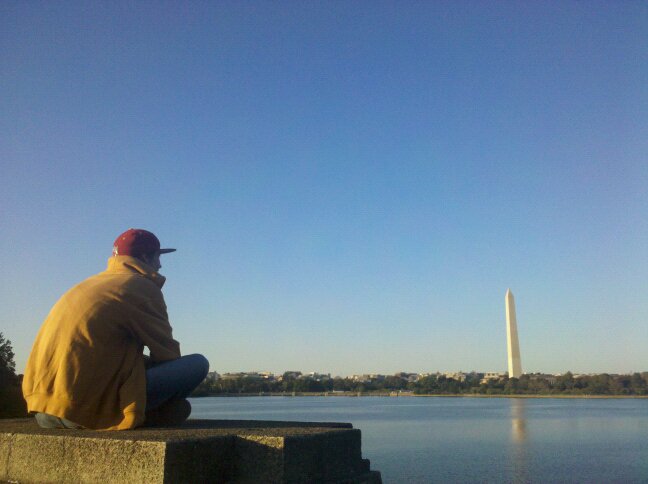
The above photos were taken from a friends phone- I know none of the details of the model or brand.  The first is the jpeg file, and the second was edited in photoshop elements version 9 in RAW mode.  I do realize the Washington monument is leaning like the tower of Piza, but this was a very quick experiment to see if I could edit a jpeg format in Raw mode, and I CAN!

I shoot with a Canon S2-IS that I've had maybe 6 or 7 years, my 4th digital camera and well loved.  One of my main beefs with it is that it does not shoot in Raw mode.  As my skills in photography and editing have progressed, I have missed not having that option to explore, and my next camera will have it.  Just as the previous post touched on the importance of having enough data to process and produce with scanned photos, shooting and processing in Raw keeps all of the data the camera has captured protected and available, even some stuff you might not be able to see until you start fiddling with it.  J peg is wonderful for being able to send anywhere, but the files degrade every time you save them.  Raw saves it.

So even with a camera that does not capture Raw images, I can process in Raw and then save it in that format by using a little "cheat" in elements.  Clever folks are always figuring out these cheats until Adobe breaks down and puts it in a new version of elements, like layer masks- if you have an elements version older than 9, search for "layer mask cheats for elements" and you will find that process on the internet.

I understand that because I'm working on jpeg and not true raw files, "not all of the options in Raw editing will be available".  I'm not sure why editing in Raw is going to be beneficial, the article I read said that it gives me options not otherwise available and I'll have fast and professional results.  I'll have to play with it much more to figure it all out.  I am excited I have a new trick to learn!

I found this trick at a site called Essential Photoshop Elements.com and here is a link to the article.  Looks like they have a wealth of other information as well.